Run ten galleries and forty events without a spreadsheet holding it together.
A studio shooting weddings, corporate events, and everything between doesn't have one delivery problem, it has one running at all times. PixelPace gives every gallery, event, client, and crew assignment a single desktop view, ingests large shoots in the background, and matches guests without a per-credit AI bill that punishes a busy season.
Built for operational load, not just a single gallery.
No cap on how many concurrent clients, weddings, or corporate shoots you're running — only your storage plan limits total capacity.
The desktop app queues and resumes large batches while you keep working, instead of tying up a browser tab per gallery.
There's no per-match credit system, so a busier season doesn't come with a bigger AI bill.
Track which shooters and editors are assigned to each scheduled shoot, without a separate scheduling tool.
Every gallery, event, and client, at a glance
The Studio home screen totals your active galleries, events, assets, and storage used in one place, then lists recent work regardless of shoot type: a wedding, a fashion editorial, a graduation, a concert. You don't need a separate spreadsheet to know what's active.
Because pricing is storage-based rather than per-photo or per-gallery, adding a new client mid-season doesn't mean re-evaluating your plan, it means watching the storage number.
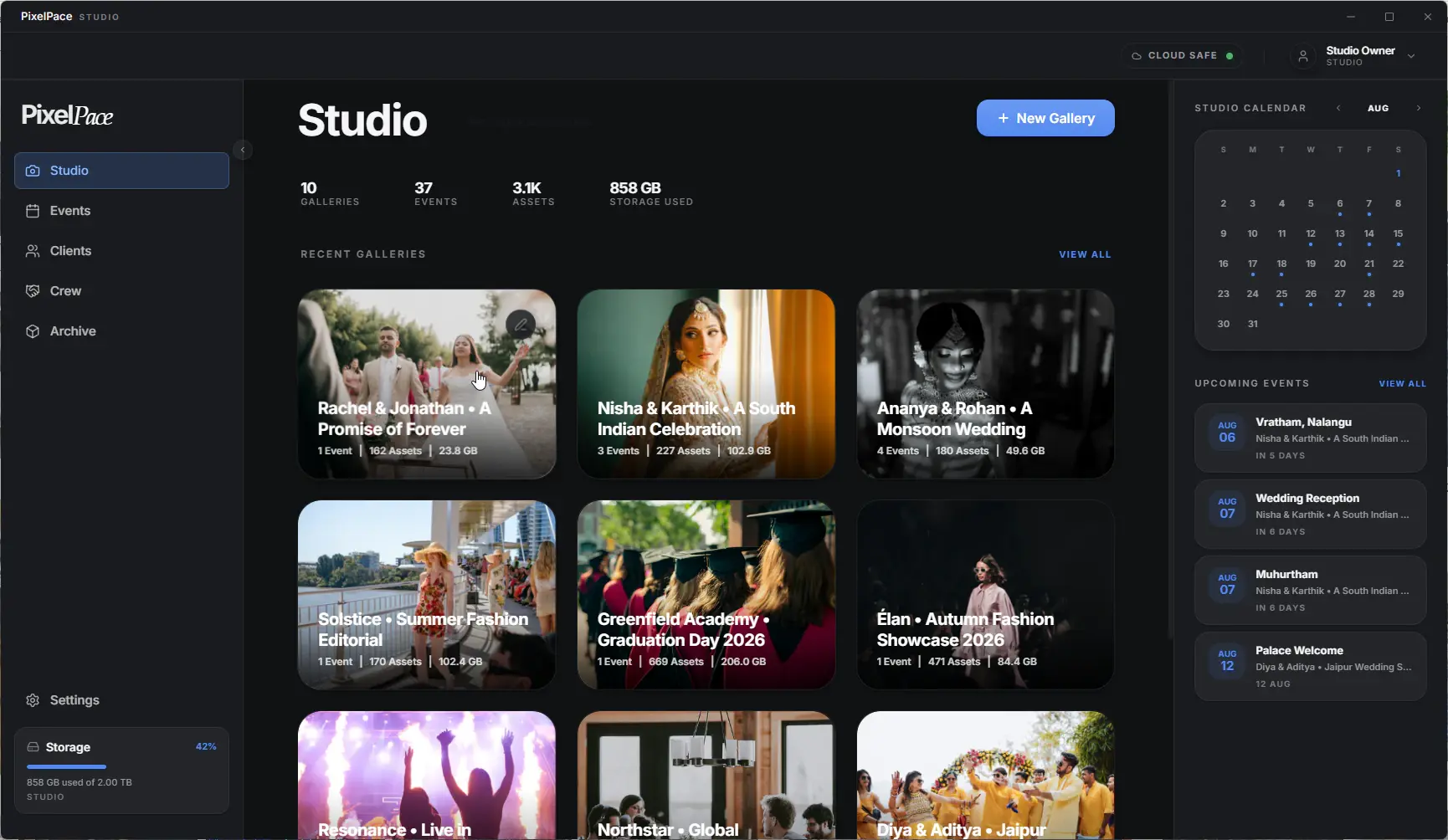
The Studio home screen, spanning every active gallery type
Know who's shooting what, without a separate tool
Each scheduled event can carry its own assigned crew, second shooters, editors, whoever's on the job, visible right next to the client and gallery it belongs to. You're not cross-referencing a calendar app against a separate delivery tracker.
Scheduled, in-progress, and delivered shoots all live in the same Events list, so a studio running several shoots a week can see status without opening each gallery individually.
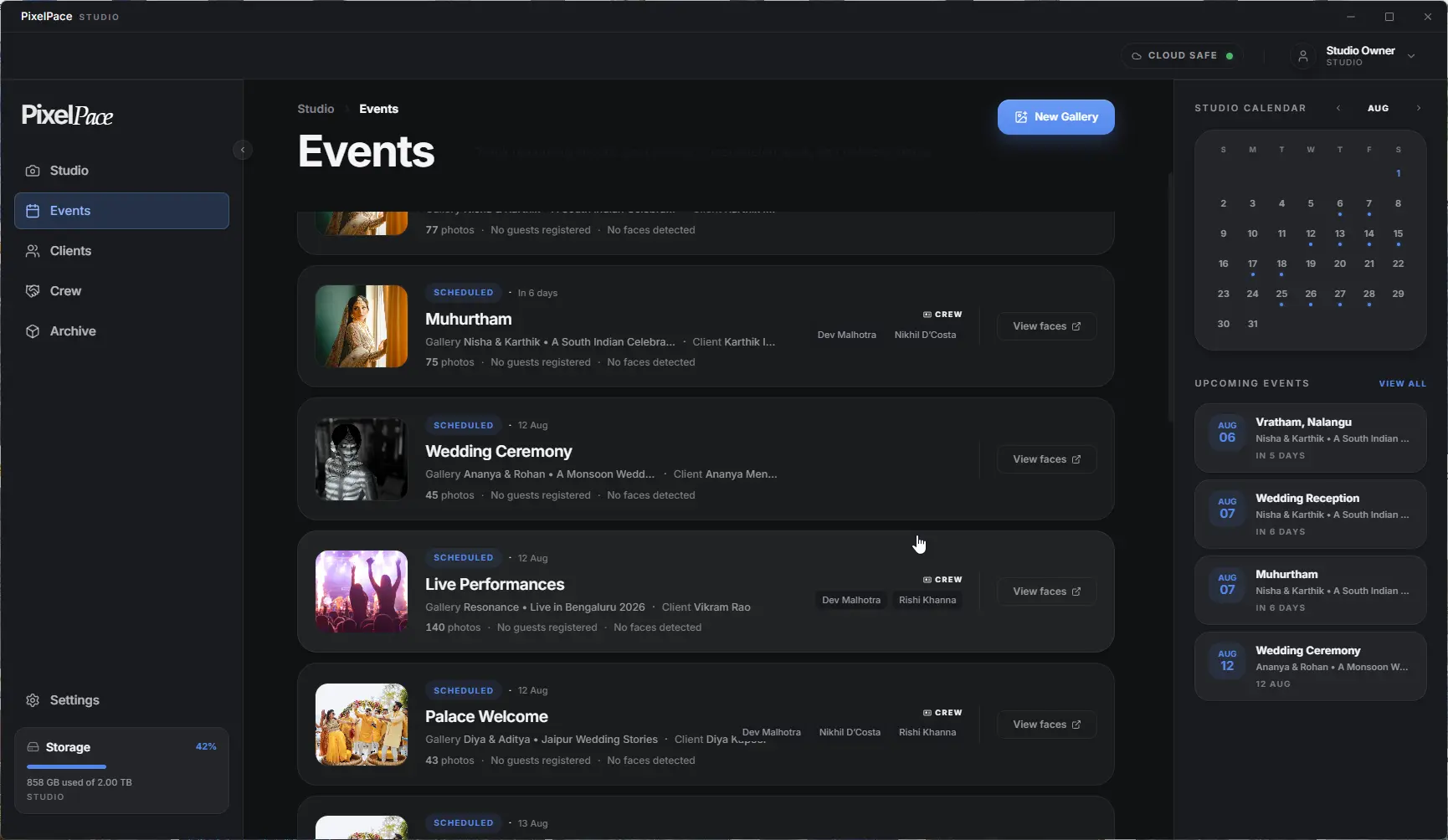
Scheduled events with crew assigned per shoot
Guest matching runs locally on the studio desktop with no per-match credit system. A studio matching guests across forty events a month pays the same for AI as one running four.
Upload large shoots without babysitting a browser tab
High-volume work means large uploads happening constantly, full-resolution photos, video, sometimes several shoots' worth queued at once. PixelPace's desktop app runs resumable background uploads: it automatically retries temporary failures, and if the connection stays down you can resume later without re-uploading files that already finished, rather than keeping a browser tab open and active.
Studios running uploads on a dedicated workstation can set Max Speed hardware utilization for maximum throughput; on a laptop shooting on location, Energy Saver conserves battery instead. Either way, the studio decides how much of the machine PixelPace is allowed to use.
Frequently asked
Does PixelPace charge separately for every AI match?
No. AI guest matching is included on every plan with no credit system, regardless of how many events or guests you're matching in a given month.
Can large shoots be uploaded from the desktop app without keeping a browser open?
Yes. Uploads run through the native desktop app in the background and automatically retry temporary failures. If the connection stays down, you can resume later without re-uploading files that already finished — no browser tab needs to stay active.
Can one studio manage many concurrent galleries, clients, and crews?
Yes. There's no cap on the number of active galleries, events, or clients — only the storage allowance on your plan limits total capacity.
What happens to galleries after they're delivered?
Completed galleries can be moved to Archive for long-term storage, keeping the active Studio view focused on current work.
Can I control how much system power PixelPace uses during large upload batches?
Yes. Hardware utilization settings range from Energy Saver, for laptops working on location, to Max Speed for dedicated workstations.
Related reading
Bring your whole studio into one view
Unlimited galleries, events, and AI matching — only storage is metered.