Deliver a wedding gallery guests can search themselves, even across four days of events.
A single wedding produces mehendi, haldi, sangeet, and ceremony galleries, often thousands of files split across days and dozens of overlapping guests. PixelPace uploads the full shoot from your desktop, groups every face privately, and lets each guest open a gallery with only their own photos — no forwarding, no 'which folder is mine.'
Built around what a wedding actually is: several events, one couple, and a guest list that repeats.
Mehendi, haldi, sangeet, and the ceremony can live as separate events inside a single client gallery, instead of scattered across separate links.
A guest scans a QR code, adds a selfie, and PixelPace privately matches them to every photo they appear in — across every event of the wedding.
Facial analysis happens locally in the PixelPace Studio app. Selfies are used only for matching, and you can revoke any guest's access at any time.
There's no per-match credit system. A 40-guest mehendi and a 400-guest reception cost the same to match.
Every function under one gallery, not five separate links
A typical wedding isn't one shoot, it's four or five: a welcome dinner, haldi, sangeet, and the wedding day itself, sometimes shot days apart. PixelPace lets you structure a single wedding client gallery as multiple events, so the couple and their guests browse one gallery instead of hunting for separate download links per function.
In PixelPace's desktop-first workflow, each event keeps its own asset count and upload status, so you always know which day is fully uploaded, face-scanned, and ready to share, without digging through folders to check.
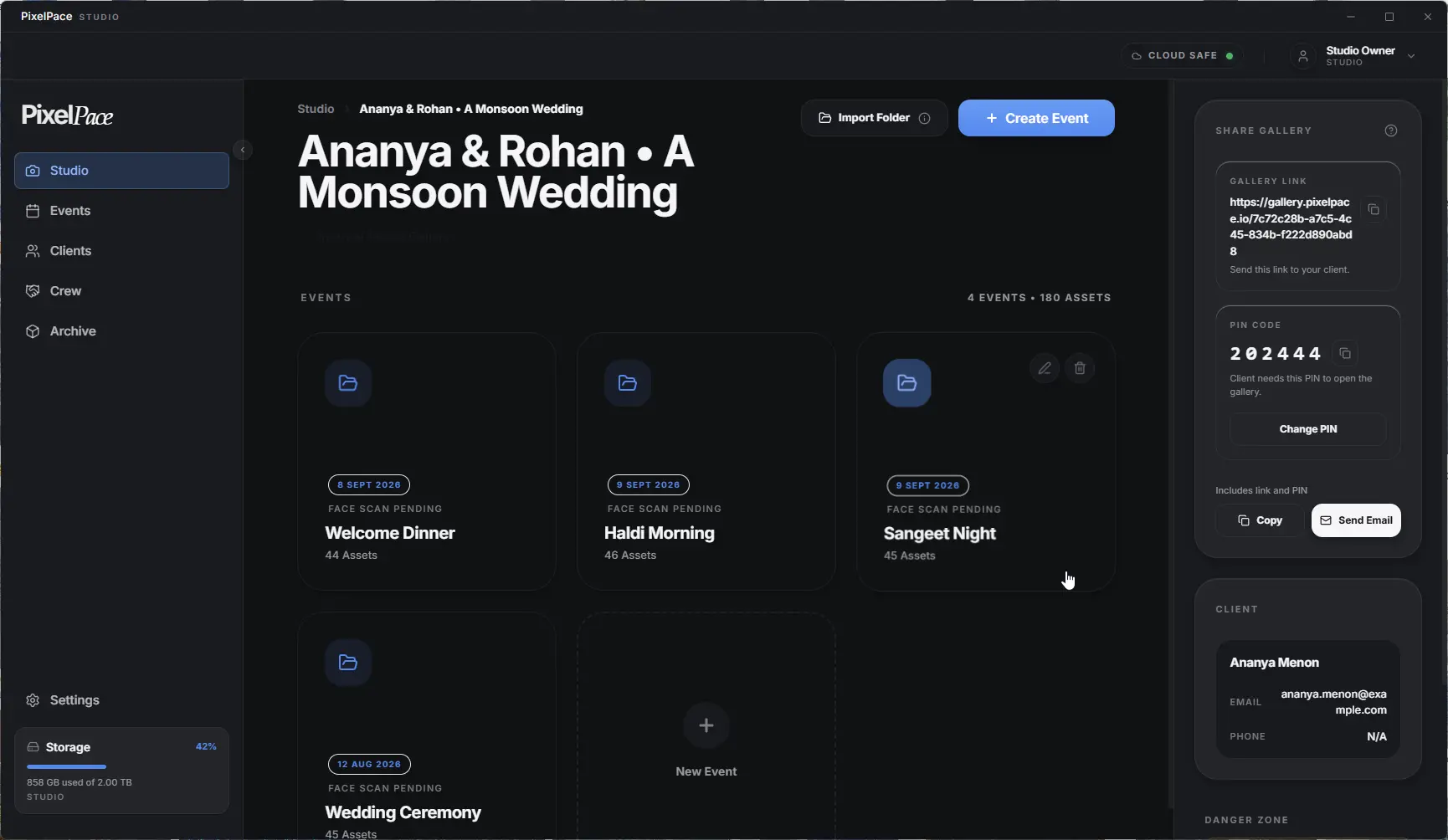
PixelPace Studio — one client, four wedding events
Guests register once and see only their photos
Guests scan a QR code at the venue, or in your post-wedding message, add one clear selfie, and register in under a minute — no app to install, just a browser. At the venue, the same QR code also lets guests share photos from their own phone to a live wedding photo slideshow on the venue screen.
PixelPace privately matches that selfie against every photo in the wedding, across every event, and groups the results under the guest's name with private people grouping. The guest receives a private link and PIN to a gallery containing only their own photos, and their matches arrive there automatically. You can review any guest and revoke access at any time.
A guest who appears in the mehendi, the sangeet, and the reception gets one gallery covering all three — they don't search three separate deliveries to find themselves.
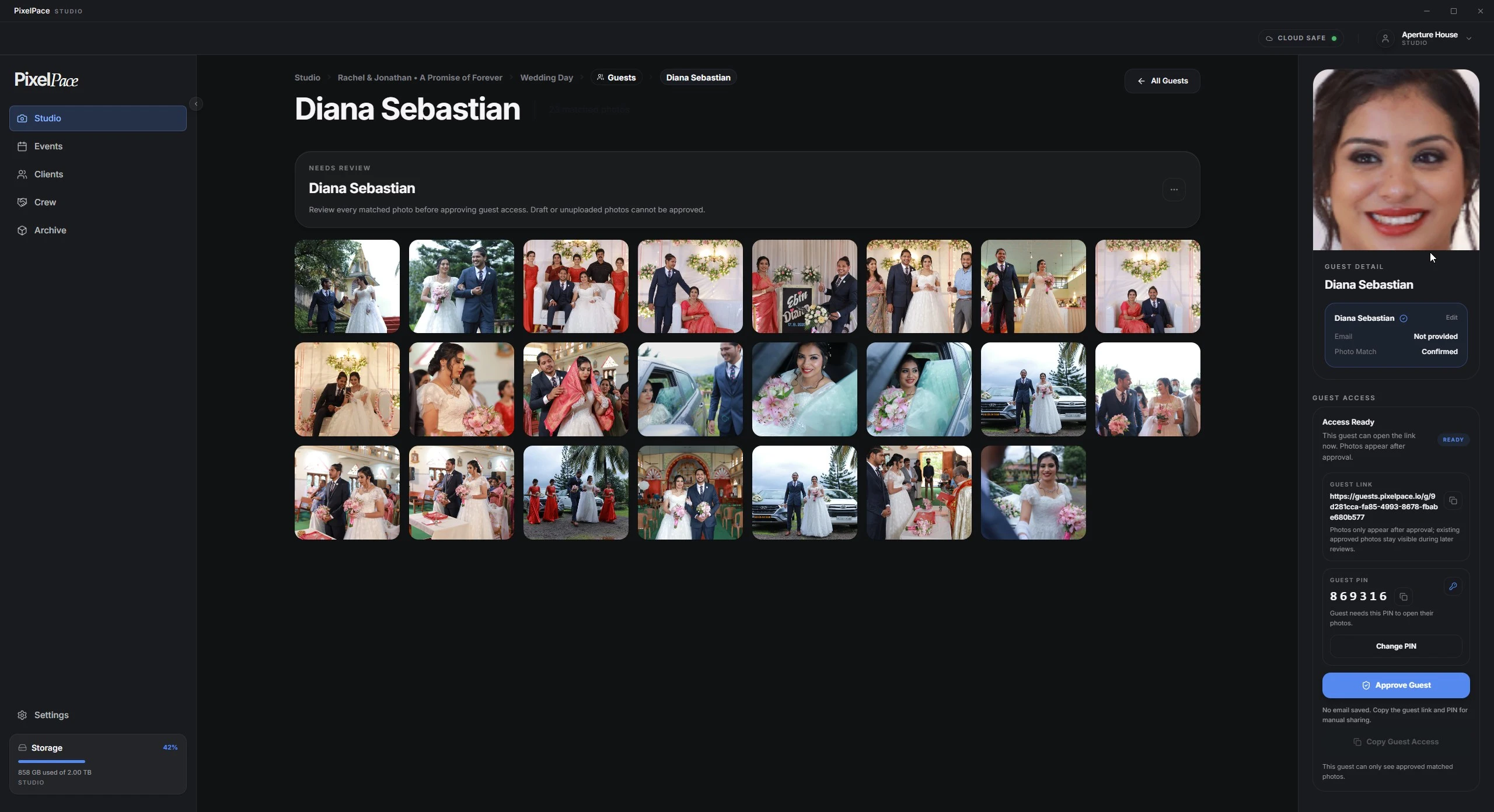
A guest's matched gallery
Facial analysis runs locally, in the PixelPace Studio app on your computer, not a cloud AI service. Guest selfies are used only to find their own photos, and you can revoke any guest's access at any time.
Real storage for original files, video, and full galleries
A well-shot wedding easily runs into tens of gigabytes once you count full-resolution originals, a second shooter's photos, and a highlight video. PixelPace plans start at 500GB and scale to 2TB, priced by storage rather than a per-photo cap that penalizes a big wedding season.
Choose Optimized Delivery for fast-loading web galleries, or switch a wedding to Maximum Quality to upload full-resolution originals alongside the previews, useful when a couple wants print-ready files rather than just a browsing experience.
Frequently asked
How do I deliver 5,000+ photos from a single wedding?
Upload the full shoot through the PixelPace desktop app, which queues large batches and automatically retries temporary upload failures. If the connection stays down, you can resume later without re-uploading files that already finished. Storage plans run from 500GB to 2TB, priced by storage rather than a per-photo limit.
Can guests find their own wedding photos without an app?
Yes. Guests register in a browser by scanning a QR code and submitting one selfie, then open their matched gallery from any device. There's no app to install on the guest's side.
Does PixelPace handle multiple wedding-day events, like mehendi and sangeet, separately?
Yes. Each function can be added as its own event inside one client gallery, so the couple gets a single gallery covering the whole wedding instead of a separate delivery per day.
Is guest face-matching processed in the cloud?
No. The matching computation runs locally on the photographer's desktop inside the PixelPace Studio app. Guest selfies are used only for matching within that wedding's gallery.
Do I have to buy AI credits for a large guest list?
No. AI matching is included on every plan with no per-match charge, so matching a 500-guest reception costs the same as a 40-guest mehendi.
Do guests have to wait for me to approve their photos?
Not if they registered with a selfie. Their confident matches are delivered to their private gallery automatically, with one email when they're ready, and you can revoke access at any time. Guests you add or name yourself are delivered after you approve them.
Related reading
See your own wedding gallery, end to end
Free to start. Unlimited AI guest matching, no credits, ever.