Why PixelPace is desktop-first photo delivery software
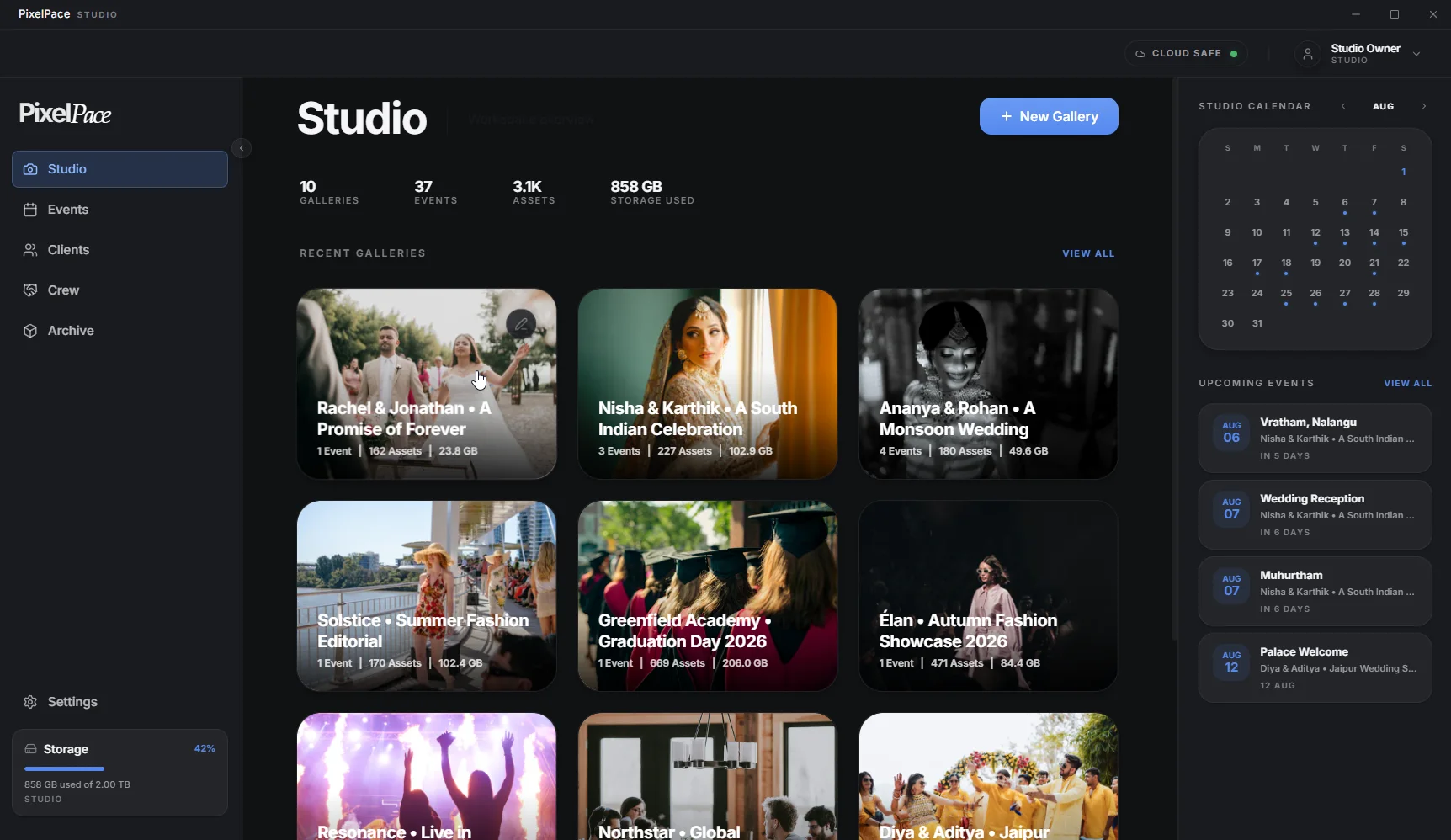
PixelPace is desktop-first photo delivery software for professional photographers who deliver high-volume weddings, events and client galleries. The photographer's side runs as a desktop app on the computer that already holds the photos, on Windows today with Mac on the way. It imports whole shoots, uploads in the background and matches faces privately. Clients and guests use a web browser and never install anything.
Why does PixelPace use a desktop application?
Because photo delivery starts with thousands of files that are already on your computer. A web browser is a good place to view a gallery. It is a less comfortable place to move a whole wedding, keep it moving for an hour and process every face in it.
So PixelPace splits the work. The heavy part, getting a complete shoot from your drive into a finished gallery, happens in a desktop app built for it. The part your clients and guests touch happens in the browser, where they already are.
What goes wrong with a big upload in a browser tab
If you have uploaded a large gallery through a web page, you know the routine. Keep the tab open. Hope the connection holds, because if it doesn't, you may be choosing the files again and working out which ones already went up.
None of this is a problem with a 40-photo portrait session. It becomes one when every week brings another wedding or event with thousands of frames, and delivery time is part of what clients judge you on.
How the desktop workflow feels day to day
Bring in whole folders
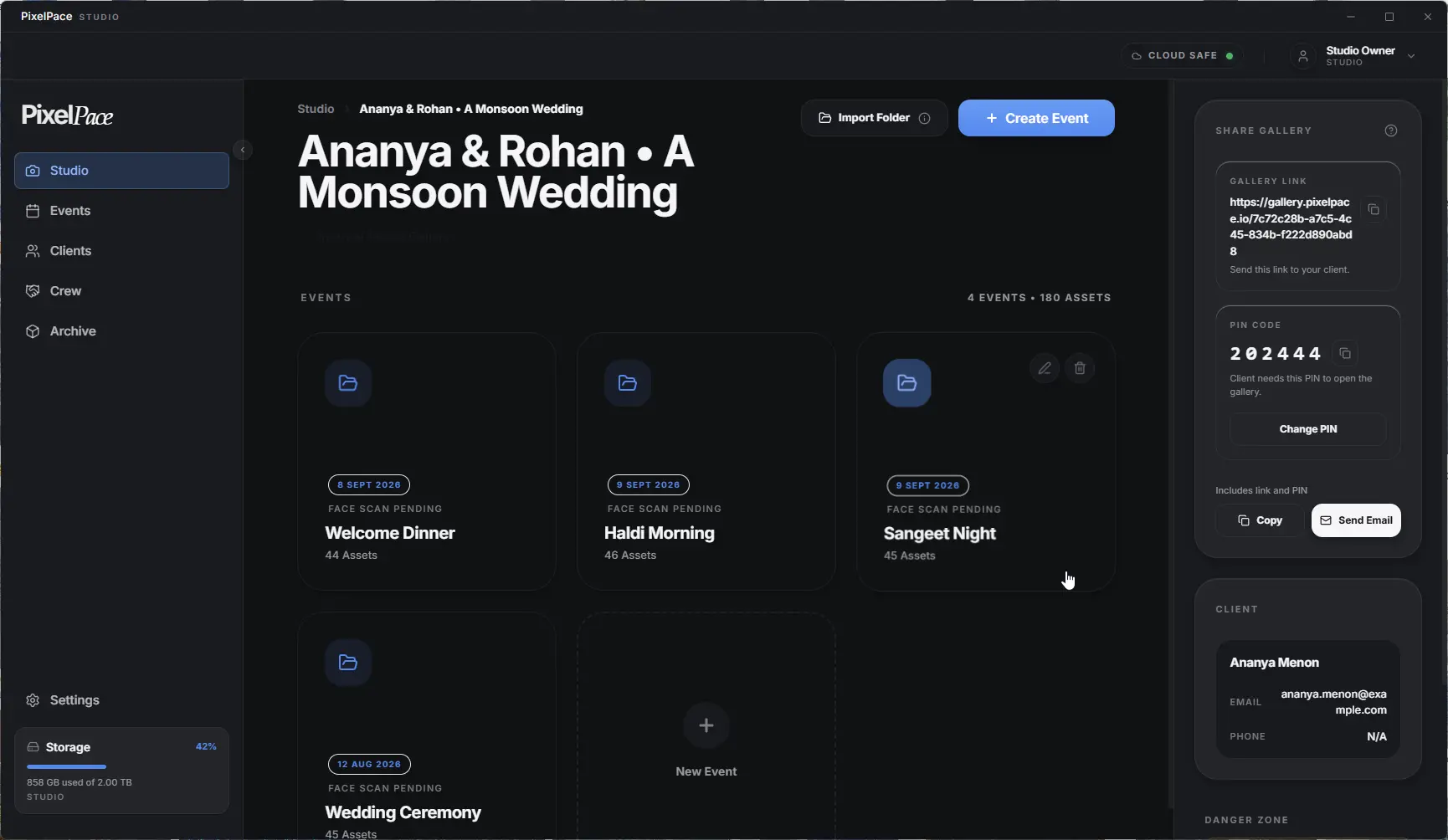
For a bulk photo upload, choose one or more folders instead of picking individual files, and PixelPace adds the photos and videos inside them. Each folder becomes its own event, so a shoot exported as “Haldi”, “Sangeet” and “Wedding” arrives as three events in one gallery, ready for your client to browse the same way.
Uploads that keep going
Previews are prepared and files are uploaded in the background while you carry on in the app. PixelPace automatically retries temporary upload failures. If the connection stays down, resume the upload later: PixelPace uses resumable uploads, so files that already finished are not sent again. There is no tab to babysit and no starting over.
You choose what goes to the cloud
- Optimized Delivery uploads high-quality web versions only. It is quicker, lighter on storage and better on slow connections, and your originals never leave your computer.
- Maximum Quality uploads your original files as well, so clients can download them for printing and albums.
Face matching on the same machine
Your computer already holds the photos, so it is also where PixelPace finds and groups the people in them. This local AI keeps the face analysis there rather than on a remote AI service, which is how private people grouping works.
The studio in one place
Galleries, events, clients, crew, guest access and storage sit together in one app, instead of across a set of browser tabs.
Is desktop software better for large photography workflows?
For large, repeated deliveries, a desktop app has practical advantages: it reads whole folders straight from your drive, keeps working in the background, recovers from a dropped connection and can process photos on your own computer. Those advantages grow with the size and frequency of your shoots.
For an occasional small gallery, a browser upload may be all you need. PixelPace is built for photographers whose week is full of weddings, events and multi-day shoots, where those advantages add up to real time.
Where PixelPace fits beside your editing tools
PixelPace does not replace the software you cull and edit in. It picks up at the end: export your finished photos to a folder the way you already do, then import that folder into PixelPace. Your editor stays your editor, and your drive stays the home of your master files.
Less dependence on the cloud
Desktop-first also means less of your work has to live somewhere else. Face analysis happens on your computer. The face data used for matching stays there. With Optimized Delivery, your originals stay there too, and the cloud holds only what your clients need to see.
Removing an event from PixelPace removes it from PixelPace, not from your drive. Your original files are left exactly where they were.
Desktop for you, the browser for everyone else
The desktop app is only for the photographer. Your client opens a private client gallery from a link. Guests register, find their photos and share their own in a browser, and their photos can play on the venue screen with Live Show. No one you deliver to has to install anything.
The Monday after a wedding weekend
You finish editing and export the weekend into three folders. You import all three into PixelPace in one go, and they become three events in the couple's gallery. The upload runs in the background while you choose the cover photo. The studio Wi-Fi drops briefly, PixelPace retries, and the upload carries on. Once it finishes, PixelPace finds the people in each event.
When it finishes, you send the couple their link and PIN from the app. Registered guests start receiving their photos. Your original files never moved from your drive.
Frequently asked questions
Does PixelPace work on Mac?
The Windows app is available now from the Microsoft Store for Windows 10 and Windows 11. A native macOS app is in final testing. Join the Mac list on the PixelPace download page and we'll email you when it's ready.
Do my clients or guests need to install PixelPace?
No. Only the photographer uses the desktop app. Clients and guests open galleries, register and share photos in a web browser on any phone or computer.
What happens if my internet connection drops during an upload?
PixelPace retries on its own. If the connection stays down, resume the upload once you are back online and it continues with the files that had not finished; files that already uploaded are not sent again.
Does PixelPace upload RAW files?
No. PixelPace delivers finished work. Export your edited photos from your editing software as JPEG, TIFF or PNG files, then import that folder. Video clips such as MP4 and MOV files can be imported too.
If I remove an event from PixelPace, are my files deleted?
The event is removed from PixelPace, but the original files on your computer are not deleted.
More of the PixelPace workflow
How PixelPace groups every person across a shoot, and why the face matching stays on your computer.
What your clients and guests see when you deliver: the cover, the events, favourites, downloads and privacy.
A live slideshow of guest photos at the event, with your studio name visible throughout the show.
Put your next shoot through PixelPace
Available now on the Microsoft Store for Windows 10 and Windows 11. macOS coming soon.