Private AI face recognition and people grouping for photographers
Stop searching an entire wedding or event shoot for one guest's photos. PixelPace uses private AI face recognition to group the same person across the whole shoot automatically, so you can find and deliver each guest's photos without tagging or searching thousands of frames. Face analysis and matching run on your own computer inside the PixelPace desktop app, not on a remote AI service. Guests who choose to register with a selfie can receive a private gallery of the photos delivered to them.
What is automatic people grouping?
Automatic people grouping uses face recognition to find every appearance of the same person across your photos and put those photos together. Instead of a folder of 2,000 wedding frames, you get a list of people, each with the photos they appear in.
It solves a problem every wedding and event photographer knows. After the event, guests ask for “the photos with me in them”. Finding them by hand means scrolling the whole shoot for one face, again and again. And you usually don't know who most guests are. The couple does.
PixelPace does the sorting for you, lets guests identify themselves with a selfie, and lets your client put names to the faces you don't recognise.
How face grouping works in PixelPace
1. Upload the event, then let PixelPace find the people
Import the event from the PixelPace desktop app as you normally would. Once the photos are uploaded, PixelPace runs AI face recognition on your computer and groups the faces that belong to the same person. The first time, the app prepares its matching tools on your machine. After that, scanning an event is one action.
2. Guests register with one selfie
Put the event's QR code on a sign, a table card or a screen. A guest scans it, enters their name, takes one clear selfie and agrees to matching for that event. Selfie matching is offered only to guests who confirm they are 18 or older. Each registered guest gets a private gallery link and PIN, sent to their email as well if they give one.
3. Review, name and correct
Registered guests appear under their own names. Everyone else appears as an unnamed person. From there you can:
- name a person, and the name follows them across the gallery;
- merge two groups that turn out to be the same person;
- mark a suggestion as “not the same person” so it does not come back;
- add a photo to someone by hand when a face is turned away or hidden.
4. Deliver, with you in control
A guest who registered with a selfie and gave consent can receive their confident matches automatically. You can turn this off for any gallery. Everyone else, including people you or your client named, receives photos only after someone approves them. You can revoke a guest's access at any time, and send the guest an email or copy their link and PIN to share yourself.
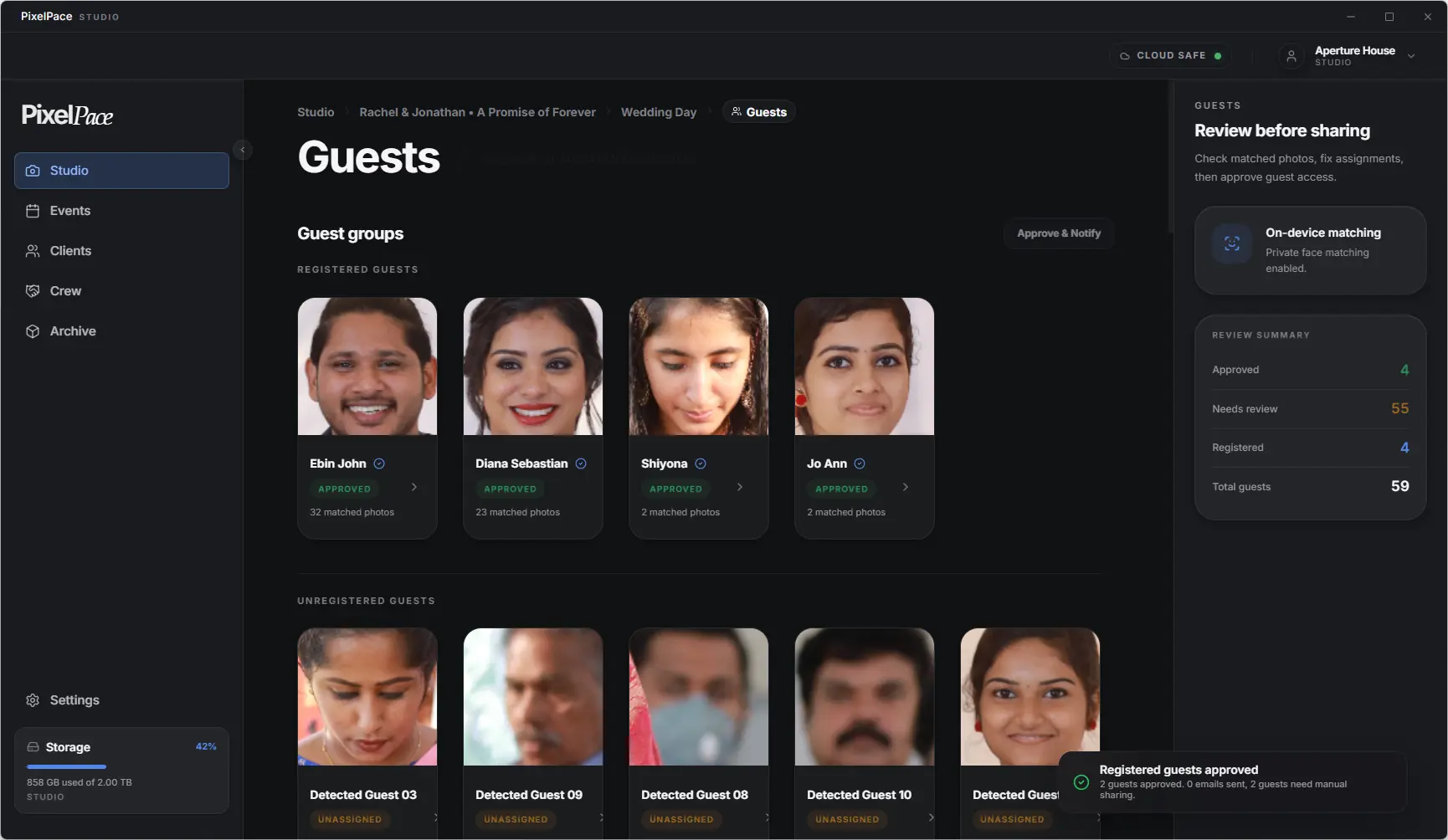
One person across every event in a gallery
Weddings are rarely one event. A gallery might hold the engagement shoot, the mehendi, the ceremony and the reception, each photographed on a different day. PixelPace scans each event separately, but recognises a person it has already seen elsewhere in the same gallery. A name you give someone at the engagement shoot is still theirs at the reception, and a guest who registered once can join the gallery's other events without taking another selfie.
Let your client name the people you don't know
The couple knows the guest list far better than you do. If you allow it, the People area of the client gallery lets your client name people, merge duplicates and approve photos for a guest. This is on by default, and you can switch it off for any gallery. Naming someone never sends them photos on its own; delivery always needs an approval or a guest's own registration.
Does PixelPace upload face data to the cloud?
No. PixelPace performs the AI face recognition and comparison used for people grouping on the photographer's own computer. The face data produced for matching stays on that computer and is not uploaded to PixelPace's servers. What is saved online is the result, meaning which photos belong to which person, so that galleries can show it.
A guest's selfie is kept in restricted cloud storage so your computer can use it for matching. PixelPace does not use your photos, guest selfies or face data to train AI models or for advertising. Deleting an event removes its guest selfies from the cloud and its matching data from your computer.
This is one of the main reasons PixelPace is a desktop-first workflow: the computer that already holds your photos is the one that does the matching. The full detail is in the PixelPace Privacy Policy, and guest deletion requests are covered on the DPDP page.
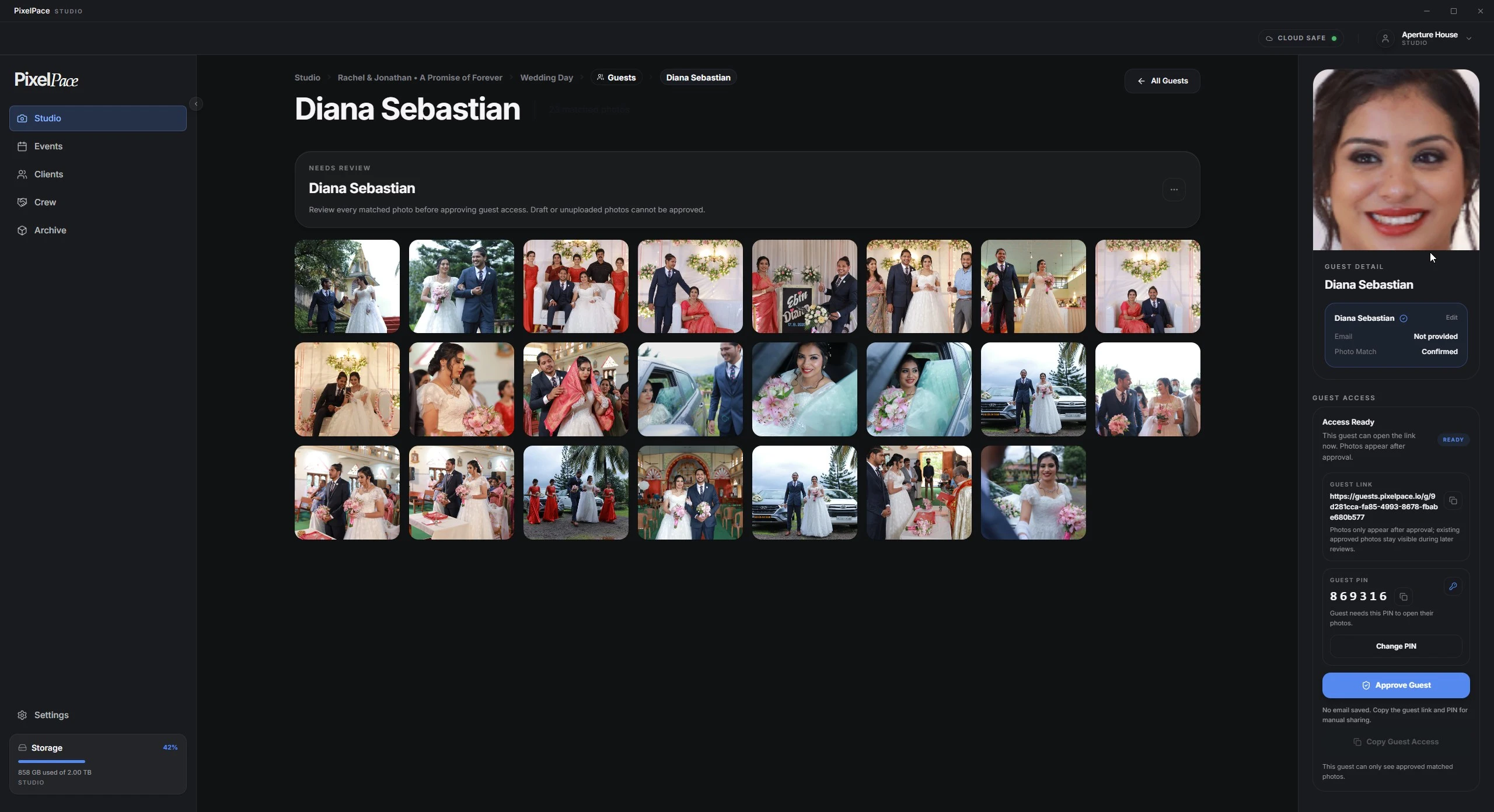
A three-day wedding, start to finish
On the first evening, the QR code sits on the welcome table. Guests who want their photos scan it and take a selfie; the rest simply enjoy the party. After each day you upload that event and let PixelPace find the people.
Registered guests who agreed to matching start receiving their photos as each event is delivered, in a gallery that holds only their own photos. Everyone else is already grouped. When the couple opens their gallery, they name the aunts, cousins and colleagues you couldn't, and approve photos for the people they want to share with. You never search the shoot for a single face.
Guests who would rather not take a selfie can still take part. They can share their own photos from their phone, which can also appear on the venue screen during the event with PixelPace Live Show.
Frequently asked questions
Do guests need to install an app to find their photos?
No. Guests scan the event's QR code, enter their name and take one selfie in their phone's browser. Their private gallery opens in the browser too.
What happens to people who never register?
They are still grouped. Each appears as an unnamed person you can name, merge or leave alone. Their photos are delivered only if you, or a client you allow, approve it.
Can a guest see photos of other people?
No. A guest gallery opens with its own link and PIN and shows only the photos that have been delivered to that guest.
Does a bigger guest list cost more?
No. Face grouping and matching are included on every PixelPace plan. There are no per-face or per-guest credits; plans differ only by storage.
What if two different people end up in one group?
Mark them as not the same person and PixelPace stops suggesting that match. If photos were already delivered to the wrong guest, revoke that guest's access and approve again once the group is right.
More of the PixelPace workflow
What your clients and guests see when you deliver: the cover, the events, favourites, downloads and privacy.
A live slideshow of guest photos at the event, with your studio name visible throughout the show.
Why PixelPace handles whole shoots in a desktop app while clients and guests use a browser.
Try people grouping on a shoot you know
Face grouping is included on every plan, with no credits and no per-face pricing.